Have you ever tried to enjoy a trip while checking your phone to make sure nothing’s going wrong back home every now and then? We’ve been there, which is why we decided to conduct a Frontpoint security system review. When you’re away for days or even weeks at a time, your home is more exposed. And the problem is, not every security system is built to handle that reality.
Below, you’ll learn about our experience with Frontpoint, a top-tier home security system that has been making a name for itself. We focus on what matters most: dependable monitoring, strong mobile controls, easy setup, and how well the system performs. We’ll get straight to the facts so you can quickly decide whether Frontpoint makes sense for your travel-heavy lifestyle!
Also read: Six Ways to Keep Your House Safe When You Go Away on Vacation
What Is Frontpoint Security?
Frontpoint is a home security company that offers DIY installation systems, allowing you to set them up yourself based on your needs. As one of the top security systems on the market, it offers a wide range of equipment, from outdoor/indoor cameras to smart sensors. For travelers, keeping an eye on their home is easy, as everything connects to Frontpoint’s mobile app, which acts as a central hub. We could watch camera feeds, arm or disarm your system, and get alerts even when we were spending our nights at a hotel in Dalmatian Coast, Croatia.
After using Frontpoint for a while, we were impressed. It has some interesting features like AI-powered deterrence, two-way audio cameras, and more. Plus, even though the equipment was extremely advanced, the setup wasn’t complicated at all. And if you do encounter a problem, Frontpoint provides support to help you get everything configured and working properly.
See on:
Plans and Packages
Now, the big question is how much Frontpoint costs. With Frontpoint, there are basically two things that you need to pay for, which are the monitoring plans (the monthly monitoring fees) and the equipment packages (the hardware you buy upfront).
Monitoring Plans
The Monitoring Plans are the monthly subscriptions that give you professional monitoring and let you use the Frontpoint app features.
- Interactive Plan (~$44.99/month): This covers round-the-clock professional monitoring for break-ins, fires, and flooding, plus you get app control of your system.
- Ultimate Plan (~$49.99/month): Includes everything from the Interactive Plan, plus advanced automation features, video analytics, and the ability to view live feeds or recorded clips.
- Video-Only Plan (~$14.99/month): A self-monitoring option we found interesting. It gives you cloud storage for your cameras without the professional monitoring service.
- In-App Safety Button ($4.99/month): A personal safety feature you can use on your phone when you’re out and about.
Equipment Packages
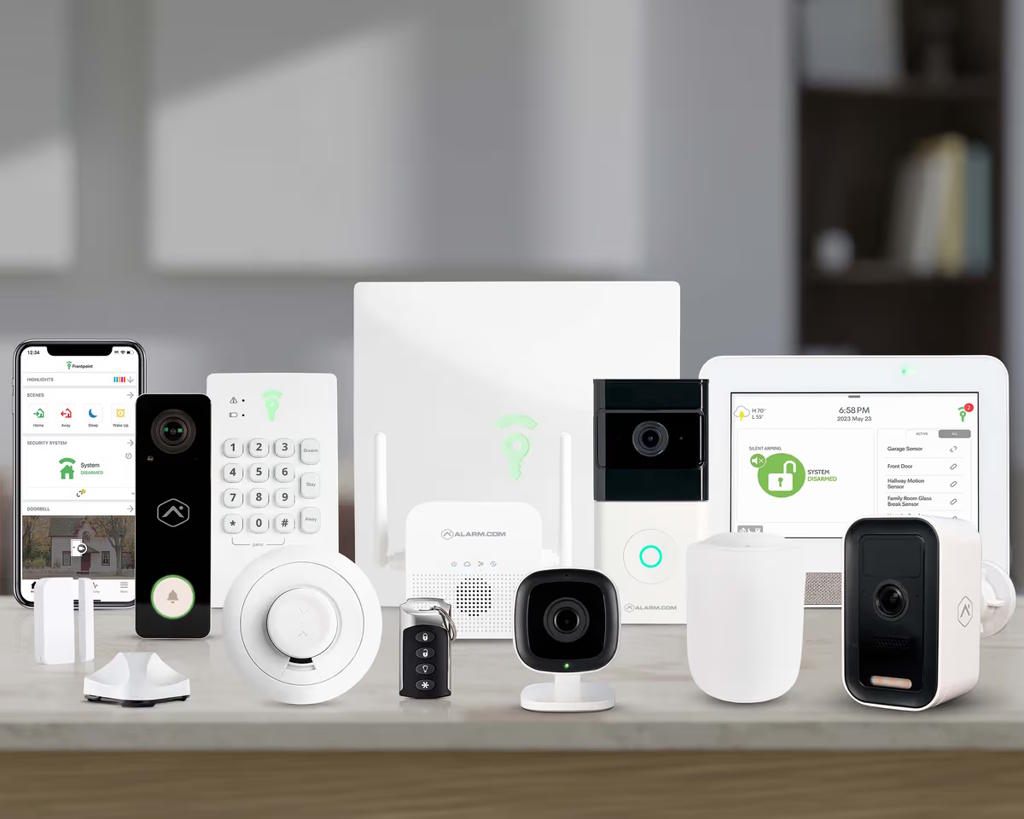
These are basically pre-made bundles for different-sized homes. The Essential Home Security System is designed for smaller places, while the Total Home Security System offers more equipment for bigger homes. Both packages use DIY installation and run completely on wireless cellular technology, which we appreciated. Aside from these two packages, there’s also the Build Your Own System, which is a 100% customized package.
| Package | Price | Hub | Door/window sensor | Motion sensor | Home defense kit | Smoke + heat sensor | Camera |
| Essential Home Security System | 414.93 USD | 1 Frontpoint Hub & Keypad | 2 | 0 | 1 | 0 | Choice of 1 camera |
| Total Home Security System | 1134.89 USD | 1 Display Hub+ | 3 | 1 | 1 | 1 | Choice of 2 cameras |
See on:
Installation Process
As we said earlier, since Frontpoint is a fully wireless DIY security system, we were able to handle the installation ourselves and didn’t have to worry about professional installation fees. It was as easy as setting up a tent! From the start, the process was well supported. We appreciated having access to a responsive support team that walked us through setup and testing when needed. This is very helpful, especially for first-time users.
Everything needed for installation came in the box, including mounting hardware and power cables, so we didn’t have to buy anything extra. Overall, it took us less than an hour to set up the entire system, including the security cameras and video doorbell. While we’ve installed faster DIY systems in the past, this was still efficient considering how feature-rich Frontpoint is. Most sensors attach using adhesive backing, so there’s no drilling or tools required, and the devices come pre-programmed. All we needed to do was pull the battery tabs, connect the sensors to the hub, and they were ready to go.
A tip from us: Most Frontpoint cameras need to be mounted with screws, so plan placement carefully to ensure power cords can reach their outlets. The indoor camera is more flexible and can sit on a shelf without mounting. Once we had installed everything, the system ran smoothly and integrated easily with voice assistants for remote control.
See on:

Customer Support
Frontpoint gives customers several ways to get help, and we love having options depending on the situation. The support ecosystem includes an online help center, phone assistance, email, and live chat, which on paper covers just about every need. During our Frontpoint security system review, we emailed them, but the response took a while. However, the other support channels made a much stronger impression and helped balance things out.
From other Frontpoint home security reviews, we learned that many praise Frontpoint’s phone support, and it turned out to be true. When we called during setup, the representatives were extremely knowledgeable, patient, and quick to walk us through installation questions step by step. We were also impressed by the redesigned online support center, which is clearly organized by issue type and easy to navigate.
See on:
Using the Frontpoint App
We really enjoyed using the Frontpoint app as well. The home screen is fully customizable, so we’ve arranged it to highlight what we use most. We also added emergency contacts like fire and medical services directly in the app, which makes everything feel centralized and easy to manage. No more digging through menus!
Where the app really shines is in its Scenes and automation features. We created routines that handle multiple actions at once, like disarming the system while unlocking the front door and checking that the garage is closed when we arrive home. At night, a single tap turns off lights, locks doors, and confirms windows are secure. The app also works smoothly with Alexa and Siri, giving us voice control over arming, devices, and scenes. Beyond automations, we regularly use the app to check live video, review activity history, and fine-tune settings. In fact, one of our favorite features is geofencing, which alerts us if we leave without arming the system, so we can take care of it remotely instead of turning around.
See on:
Is Frontpoint Worth It?
Based on our Frontpoint security system review, we think Frontpoint is worth it for anyone who wants a simple, dependable home security system without unnecessary complications. The equipment lineup is designed to cover the whole property, and the installation process is refreshingly easy. On top of that, Frontpoint’s support team stands out for being approachable and available every day, which makes a difference when questions come up.
Pros
- Effortless installation
- 30-day free trial
- 3-year warranty
- Excellent customer support
- Competitive equipment prices often come with special deals
Cons
- Month-to-month contract available only via phone
See on:
What is Frontpoint’s Warranty Policy?
Frontpoint’s warranty policy includes a three-year limited warranty on equipment bought directly from Frontpoint, meaning that if a covered device fails due to a defect within that period, they’ll repair or replace it at no extra cost.
How does the 30-Day Risk-Free Trial Period work?
Frontpoint’s 30-Day Risk-Free Trial Period starts on the day you receive your initial equipment and gives you 30 days to try the system and see if it fits your lifestyle. If you’re not satisfied, you can return the complete system within that window for a full refund of equipment and monitoring costs, and Frontpoint even covers the return shipping.
How do I activate a new sensor or other piece of equipment for my system?
To do that, open the Frontpoint app and use the Setup Wizard by selecting the Equipment Setup option from the menu. From there, choose the category of the device you’re adding and follow the app’s step-by-step instructions to activate, mount, and test it.
Some images on this article are copyrighted by Frontpoint.
