We’ve all been there — scrolling through Pinterest boards of sun-drenched beach houses and cozy mountain cabins, dreaming of a vacation home we can truly call our own. But turning that dream into a reality has always felt daunting, especially when it comes to the design process. Hiring an interior designer can cost thousands of dollars, and most of us don’t know where to even begin with floor plans. That’s where Homestyler comes in. So, how does one design a vacation home with Homestyler?
Anyone can use this professional 3D home design platform, from first-time homeowners to seasoned real estate investors, to design a stunning space without a design degree. Whether we’re planning a lakeside retreat or a tropical villa, the platform gives us the tools to bring our vision to life in vivid, photorealistic detail. With millions of users worldwide and an ever-growing library of over 150,000 furniture and decor models, Homestyler has become the go-to resource for designing beautiful spaces. In this article, we’ll walk through some of the best features of Homestyler that we can use to design our dream vacation home from start to finish.
Also read: Vacation Ideas in Winter: Curated by Travel Experts.
Floor Planner
5
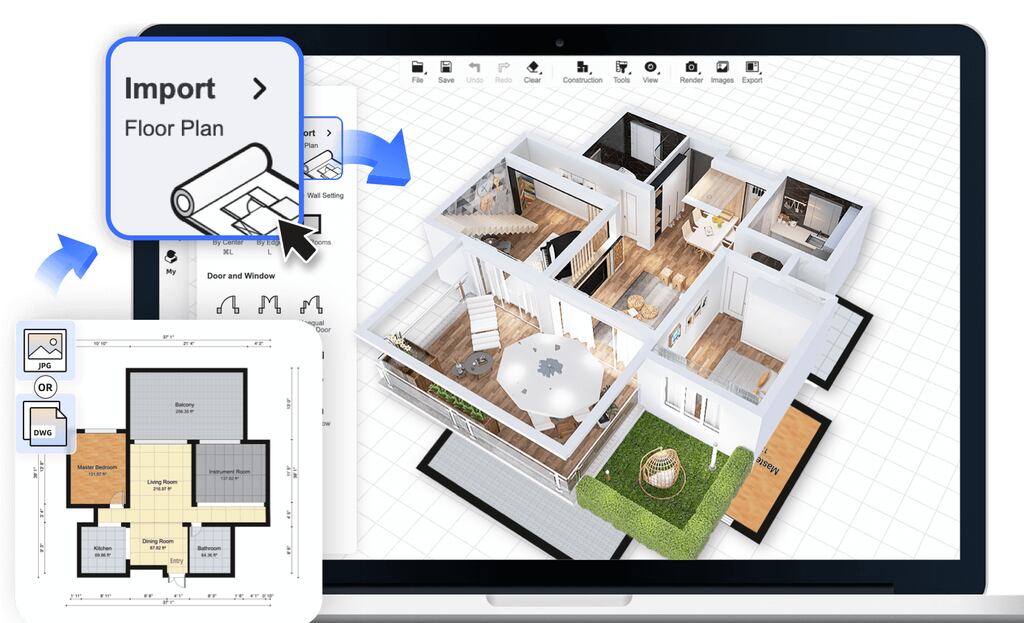
Every great vacation home starts with a great floor plan. Homestyler’s Floor Planner is the foundation of the entire design process, and we love how intuitive it is to use. We can draw walls, set precise room dimensions, add windows and doors, and arrange spaces exactly the way we envision them, all without any technical drawing skills whatsoever.
The tool supports both imperial and metric measurements, which is especially useful for those of us designing vacation homes in different countries. We can sketch a simple rectangular beach house or a multi-level mountain chalet with ease, and the platform automatically generates a 3D model as we draw in 2D. What really sets this feature apart is how quickly we can go from a rough idea to a fully structured layout. In a matter of minutes, our dream vacation home starts to take shape. The Floor Planner also allows us to import existing blueprints, which is a massive time-saver if we’re working with a property we’ve already purchased. For first-time designers, there are ready-made room templates to get us started, making the whole experience feel approachable rather than overwhelming.
See on:
AI Planner
4
We never imagined that designing a complete home layout could take just a few clicks, but Homestyler’s AI Planner makes it possible. This groundbreaking feature uses artificial intelligence to automatically generate a fully furnished floor plan based on a few inputs from us, such as room dimensions, the number of rooms, and our preferred style.
For our vacation home, this means we don’t have to spend hours manually placing furniture or second-guessing traffic flow. The AI Planner does the heavy lifting by intelligently arranging rooms, hallways, and furniture in a way that’s both functional and aesthetically pleasing. We can then take this AI-generated layout as a starting point and customize it to our heart’s content. Want to swap the bedroom and living area? Done. Prefer a more open-plan kitchen? No problem. The AI Planner is particularly valuable when we’re designing a vacation rental, because it helps us think about how guests will move through the space. It’s also a fantastic way to explore multiple layout options in a short amount of time before committing to one direction. The feature is available directly within the design editor, and the results are genuinely impressive.
See on:
3D Visualization and Video Render
3
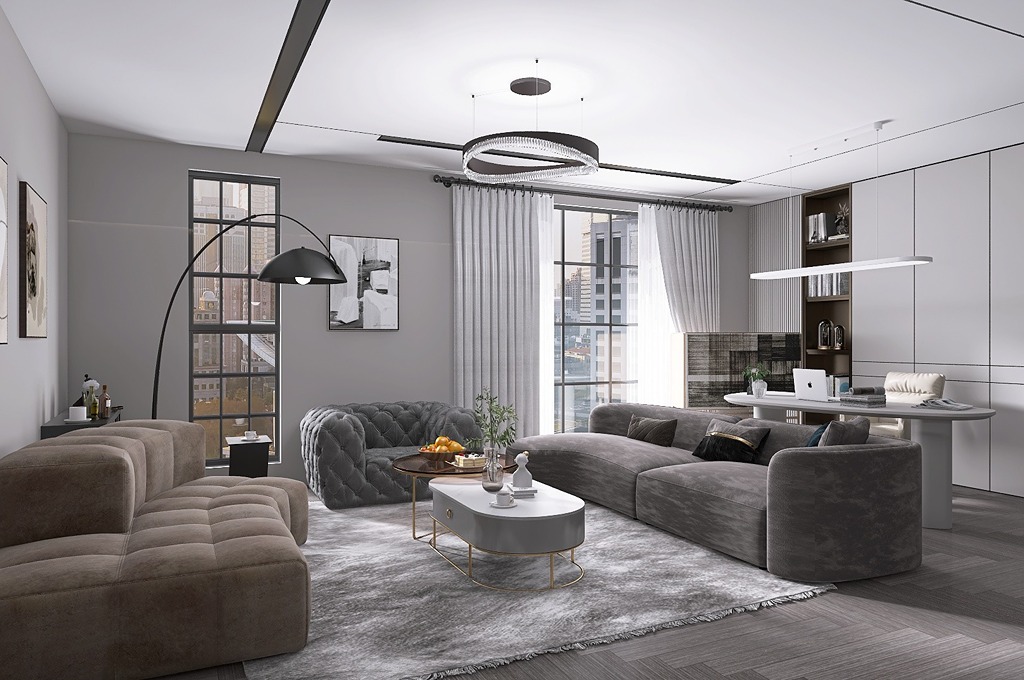
There’s a world of difference between looking at a flat floor plan and actually feeling like you’re standing inside a room. Homestyler’s 3D visualization tools bridge that gap beautifully. Once we’ve set up our floor plan, we can switch to 3D mode and tour our vacation home as if we were physically walking through it, with realistic lighting, shadows, and material textures.
But the real showstopper is the Video Render feature. We can create a cinematic walkthrough of our entire vacation home, complete with natural lighting effects that change based on the time of day we select. Imagine being able to show family members or potential rental guests a smooth, professional video tour of a home that doesn’t even exist yet — that’s exactly what this feature delivers. The renders are photorealistic enough that many users actually mistake them for real photographs. For vacation homes specifically, this is invaluable because we can see how the morning sun falls through the bedroom windows or how the living room looks lit up at golden hour. The 3D visualization tools also help us spot design mistakes before we ever spend a dollar on actual furniture or renovations. We’d always rather catch an awkward corner or poorly placed doorway on screen than in real life.
See on:
Asset Market and Furniture Library
2
A vacation home’s personality lives in its furnishings and décor, and Homestyler’s Asset Market gives us access to an enormous catalog of real-world products and designer models to choose from. With over 150,000 3D models available, we can furnish every single room of our vacation home with pieces that reflect our exact taste and style.
What makes the Asset Market truly special is that many of the items featured are actual products from real brands and retailers. This means we can see exactly how a specific sofa or dining table will look in our space before purchasing it — a feature that saves both money and frustration. For a beachfront vacation home, we might browse coastal-inspired wicker furniture and linen bedding. For a ski chalet, we might opt for rich wood textures and plush area rugs. The catalog is organized by category and style, making it easy to filter exactly what we’re looking for. We can also access free templates that give our vacation home design a curated, cohesive look right from the start. Whether we’re furnishing a studio-style getaway or an 8-bedroom family retreat, the depth of the Asset Market means we’ll never run out of options to explore.
See on:

VR and AR Technology
1
One of the most exciting ways to experience our vacation home design is through Homestyler’s VR and AR technology. This feature takes our 3D design off the screen and places us directly inside it — either through a virtual reality headset or through the augmented reality view on our smartphone or tablet.
Using the AR feature, we can point our phone’s camera at an actual empty room and see how Homestyler furniture and décor items will look in the real space. This is especially useful when we’re visiting a vacation property before renovating or furnishing it. Instead of guessing whether that king-size bed will fit comfortably in the master bedroom, we can literally see it placed there in real time. The VR mode, on the other hand, allows us to take a fully immersive tour of our designed vacation home before anything has been built or purchased. We can walk from room to room, look up at ceiling details, and get a genuine sense of scale and proportion. For those of us who struggle to visualize spaces from flat plans, this feature is an absolute game-changer. It also makes collaborating with partners, family members, or contractors far easier.
See on:
Is Homestyler free to use?
Yes, Homestyler offers a free plan that gives us access to a wide range of design tools, including the Floor Planner, 3D visualization, and a large portion of the furniture library. For more advanced features such as high-resolution rendering, Video Render, and expanded asset access, Homestyler offers paid plans. These are available on a monthly or annual subscription basis, and the pricing is designed to be accessible for both individual homeowners and design professionals. We recommend starting with the free plan to get a feel for the platform before deciding whether an upgrade makes sense for our vacation home project.
Can we collaborate with others on a vacation home project in Homestyler?
Absolutely! Homestyler includes a Team Collaboration feature that allows multiple users to work on the same design project simultaneously. This is incredibly useful when we’re designing a vacation home with a partner, co-owner, or family member who has their own ideas about how the space should look. We can share our project via a link and invite collaborators to view or edit the design in real time. For those working with interior designers or architects on a vacation home renovation, the collaboration tools make it easy to keep everyone on the same page without endless email chains and file attachments.
Does Homestyler work on mobile devices?
Yes, Homestyler has a dedicated mobile app available for both iOS and Android devices, and it’s optimized for a smooth design experience on smaller screens. We can start a project on our desktop and then pick it up on our phone while we’re out visiting the actual vacation property. The mobile app also unlocks the AR feature, which lets us use our phone’s camera to place virtual furniture in a real room. While the full desktop version offers the most comprehensive set of tools, the mobile app is genuinely powerful and a great companion for on-the-go design decisions.
Some images on this article are copyrighted by Homestyler.
