
Looking for a hotel online is sensory overload — the sheer number of hotel websites and options is enough to freeze up anyone. Luckily, we have trivago, a metasearch engine and a single powerhouse of a website that has always helped us navigate the never-ending labyrinth of the online hotel scene. When we go looking for cheap hotels, Trivago compares a bevy of lodging options to help us find the ideal digs for our stay while also saving us a bit of money at that. What’s more, it works for destinations across the world, as well as hotels of all sizes and stars, and with all kinds of amenities that we are exactly looking for.
Clearly, dealing with Trivago greatly calms our senses whenever we’re planning accommodations for any of our holidays. Here’s the detailed scoop on how to find affordable stays on Trivago for any holiday.
Also read: How To Save on Hotels Using Trivago?
An Introduction To Trivago’s Hotel Search
Trivago.com isn’t a booking site; rather, it’s a is a price comparison site showing hotel prices for more than 5 million properties in over 50 countries. It searches across numerous booking platforms, including independent hotels, hotel chains, and online travel agencies — and all in one place. The search engine can pull up prices for the same hotel from hundreds of websites, including Priceline, Trip.com, VRBO, Hotels.com, Expedia, and Booking.com.
Trivago’s recommendations are based on an algorithm that takes into account not just the offer or deal price, but also the general attractiveness of the offer as well as the accuracy of the rates provided by the booking sites. Once users find a deal that they like, Trivago transfers them to the booking site that offers that specific rate to complete the booking process. Keep in mind that the initial rate you see doesn’t include fees and taxes. The final room rate will be available and viewable on the booking website that you finally choose.
Also, keep in mind that Trivago only looks for hotel prices, and not other components such as rental cars or flights. One can begin their Trivago hotel search on Trivago.com by entering the region, the city, or a specific property that they have in mind. They need to specify their travel dates, the number of guests and rooms, and then click on “Search.”
Buy on:
Price Filter
In order to understand the filters on Trivago.com better, we began a search of our own. As you can see in the image below, when we begin our search for the best hotels in the gorgeous city of Istanbul in Turkey, we see a plethora of properties. That’s why one of the best ways to look for cheap stays is to apply filters to narrow down the search.
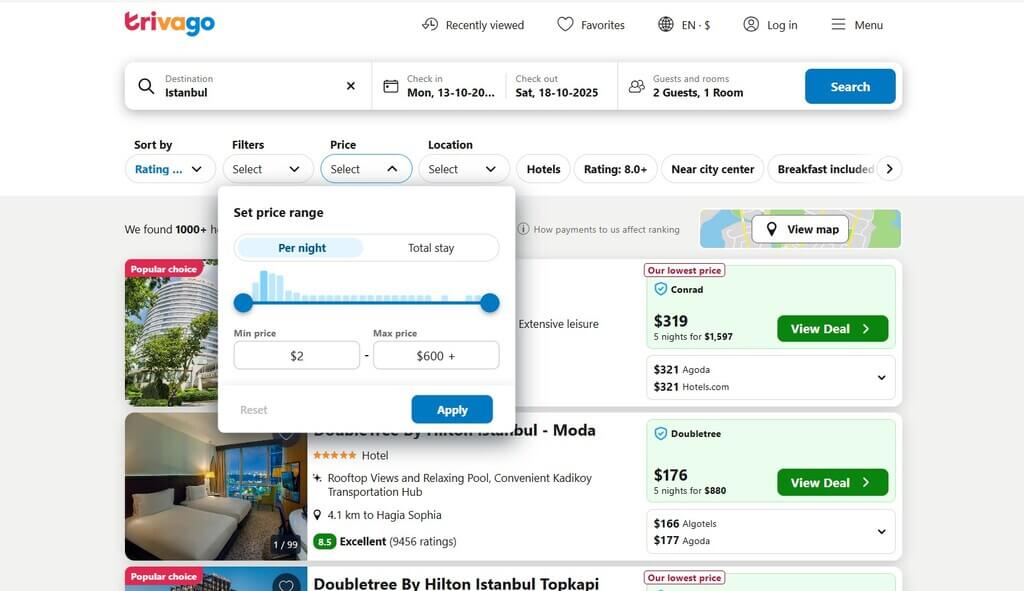
First of all, we could set the price range either per night or for the total number of nights that we were planning to stay. This is especially helpful if you still haven’t decided on your itinerary and the number of nights you want to stay in a place. It allows you to see whether you’re still within your budget or not at a single glance.
After we put in the price filter (USD 30-100 in our case), the list of hotels previously on our screen changed according to the filter. An interesting thing to note is that even after putting a filter, you can sort the hotels depending on a few features. These include featured stays, ratings, and Trivago recommendations, Price, Distance, Top guest ratings, Distance from the city center, and by Price only. So, even after you’ve put in the price filter, you can decide to sort the stays according to these filters, so they match your top preferences and not just stay within the filter.
Buy on:

Type of Property and Location
Another factor when it comes to looking for cheap stays on Trivago.com is the location and the kind of property. Even if you’re looking at cheap stays, you probably do not want to stay an hour away from the city center and spend time and money traveling up and down every day. Additionally, safety is another important factor, which is why the location is so important. Last but not least, the kind of property also matters, even if it’s cheap stays. That’s because while couples and younger travelers might be able to manage with B&Bs or hostels, families, especially with kids and older people, will definitely need hotels or apartments fully kitted out with amenities.
“Filtering stays by their location and type really helped us save a lot of time in finding exactly what we were looking for.”
WOW Travel
So, whether you’re looking for a specific neighborhood or even a place close to a specific address — say, a market or a tube station — you could enter or select it as well. Additionally, you need to choose a property type, whether it’s a hotel, a bed and breakfast (B&B), a hostel, a guesthouse, or an apartment. Not only can you choose the property type, but you can also uncheck the ones that don’t interest you.
Another great feature that Trivago has is an interactive map, which could help you find a cheap but great hotel based on location. After entering the search criteria, you’ll get a map next to the list of results. It marks every hotel with the price per night too, so you’ll know which hotels are within your budget easily. Moreover, hovering over the price gives you more information about the hotel, after which clicking the pop-up transfers you to the booking website to complete the reservation.
Buy on:
Additional Filters
There are other factors that helped us look for cheap stays on Trivago.com. For instance, we could use the “More Filters” drop-down box as we were looking for specific hotel features, such as Free Wi-Fi and a balcony. Furthermore, the criteria even include pool, hot tub/whirlpool, spa, sauna, fitness center/gym, bike rentals, beach, airport shuttle, 24-hour room service, and adults-only. Free cancellation? Halal food? Trivago’s filters have them all.
When the final list with all filters you’ve applied appears, every listing will display all important information about the hotel, along with a few different prices. If you want to see all the prices, simply use the dropdown arrow to expand the list. Clicking on a price takes you to a separate website (either that of an online travel agency or a hotel website) to complete your booking.
Buy on:
Reviews
Even if we’re looking at cheap properties to stay at, we certainly don’t want to stay at ones with bad reviews or low ratings. That’s why filtering the “Ratings” filter is also important, as it allows you to eliminate stays with poor ratings. We usually stick to a rating of 8 out of 10, and usually don’t go below that. So, we check the box with the “Very good” guest rating. Similarly, if you don’t want to settle for anything less than an 8.5, then check on the “Excellent.” As a result, Trivago will filter out properties that have reviews and ratings less than that number. Furthermore, hovering the cursor causes more information about the hotel to appear, which includes the number of reviews, the guest rating, and even the website with the best deal.
Buy on:
Flexibility
Finally, the trick to finding cheap stays on Trivago, besides all of the above, is considering being a bit flexible when it comes to both the dates and the accommodations. Sometimes choosing a different hotel or staying in a different neighborhood, even if it’s just three lanes away, could result in significant savings. Plus, you might actually end up finding exactly what you’re looking for. Furthermore, another way to ensure you end up with the best options for cheap stays is booking your stay well in advance. That’s because prices tend to increase as you get closer to your chosen travel date.
Buy on:
How does booking with Trivago work?
Trivago helps travelers compare prices of stays across different websites, but the actual booking and payment are managed by the specific booking site. So, Trivago cannot cancel or manage your reservation.
Are you looking for a beach vacation next? Check out the Top Beach Hotels To Book on Trivago.
Does Trivago have free cancellation?
While Trivago won’t charge you anything to cancel, it’s important to find out beforehand whether the hotel you’re booking or have booked might have cancellation fees or charges. Just check the hotel’s cancellation policies and associated fees.
How do I find my booking on Trivago?
Trivago will have sent a booking confirmation mail to the email ID associated with your account or your booking. Or you could log into Trivago with your login credentials.
Some images on this article are copyrighted by Trivago.
